
The Default Voicemail numbers are:
5000
Internal from any extension on the PBX (User will be prompted for their extension number and password).
5001
Internal from the extension of the User checking Voicemail (the user will only be prompted for a password).
Voicemail PINs
The following PIN numbers are blocked for security reasons, and cannot be used in the Portal.
0000, 1111, 2222, 3333, 4321, 4444, 5555, 6666, 6789, 7777, 8888, 9876, 9999, 1234, 12345, 123456, 4321, 54321, 654321, 98765
Accessing Voicemail from Outside the Phone System
Get to your voicemail prompt by dialing a DID, or through an Auto-Attendant (AA). Once you hear your voicemail greeting press star(*) to be prompted for your password.
What is Enhanced Voicemail?
Enhanced Voicemail (also referred to as Enterprise Voicemail) is a treatment that gives the caller an option to try a different extension before prompting them to leave a message.
Note: Forwarding voicemail through the User Portal is a portal feature and will not trigger the Email Notification of the intended user the voicemail is forwarded to.
Call Flow with Enhanced Voicemail
- The caller dials a DID or extension number
- The caller hears the called party's voicemail greeting
- The caller hears "To dial another extension press 1, to leave a voicemail press 2 or simply stay on the line" (at this point, the caller can also dial 0 to reach the Operator extension).
- If option 1 is chosen and the domain has an auto-attendant, the caller will be directed to the auto-attendant and can dial another extension or choose the options available while in the AA menu. If the domain does not have an auto-attendant, a default prompt will play.
- If option 2 is chosen, the caller hears "Please leave a message after the tone".
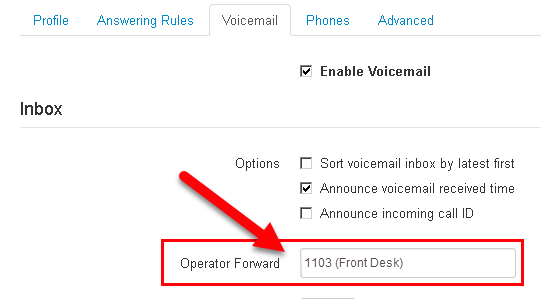
Warning: Pressing 0 to reach the Operator extension is not enabled by default. To turn on you will need to set Operator Forward to which extension it will route to.
A custom voicemail greeting that announces the option when pressing "0" should also be uploaded.
Call Flow with Enhanced Voicemail Disabled
- The caller dials a DID or extension number
- The caller hears "Your call is being forwarded please hold"
- The caller hears the called party's voicemail greeting
- The caller hears "Please leave a message after the tone".
Voicemail Graphical Options Menu

Click on the image above for a high-resolution image.